
Simplify Campaign Setup: Edit, Swap, and Stay in Control—All in One Place

Running a campaign should feel smooth—not like jumping between pages just to make simple updates.
But until now, making changes to templates, toggling channels, or managing campaign details could slow things down and interrupt your workflow.
That’s exactly why we’ve rolled out a set of updates designed to make campaign setup faster, clearer, and more flexible, so you can stay focused on execution, not navigation.
Why Campaign Setup Used to Feel Slower
When building or editing campaigns, users often needed to:
Jump between pages to edit templates
Manually reselect templates when testing variations
Navigate extra steps just to adjust campaign channels
These small frictions add up—especially when you're trying to launch or optimize quickly.
A Smarter, More Streamlined Campaign Experience
With these new updates, you can now manage key parts of your campaign directly from one place—no extra steps, no unnecessary clicks.
Edit Templates Directly from the Campaign Page
Need to tweak your messaging or design?
You can now click “Edit” right from your campaign view and make changes instantly—without leaving the page.
This means:
Faster adjustments
Less back-and-forth
More control while building
Swap Templates in Seconds
Testing different messaging or visuals?
You can now use the blue dropdown above any template to quickly swap it out.
Search by keyword, preview options, and update your campaign in just a few clicks—no need to start over.

More Control Over Campaign Channels
You’ll also notice clearer controls for selecting or excluding channels like SMS.
We now recommend excluding SMS from most campaigns, especially when getting started, since it involves additional setup and compliance requirements.
This gives you:
A simpler starting point
Fewer setup hurdles
More focus on what works best first (like direct mail and email)

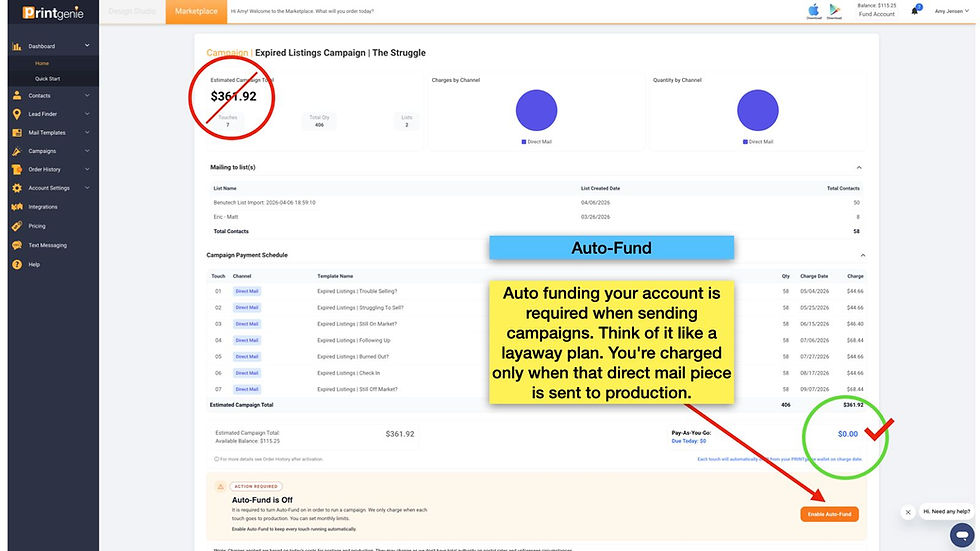
Auto-Fund Visibility Built Right In
You’ll now see clearer messaging around Auto-Fund directly within your campaign.
Auto-Fund ensures your campaign continues running smoothly by:
Charging only when mail is sent to production
Preventing interruptions due to low balance
Giving you full control over your spend
Think of it as a “set it and stay protected” system for your campaigns.
Dynamic Profile Assistant (DPA) — More Flexibility
When setting up templates, your Dynamic Profile Assistant will guide you on what information is missing.
Now, you also have the option to skip certain elements if needed.
That means:
No more blockers during setup
Faster campaign launch
Flexibility when information isn’t ready yet

Why This Matters
Campaign setup should help you move faster—not slow you down.
These updates are designed to give you:
Faster editing and iteration
Clearer campaign control
Less dependency on support
A smoother, more intuitive workflow
In short: everything you need, right where you need it.
Take Action Now
Log into your PRINTgenie account and explore the updated campaign experience.
Edit templates instantly
Swap designs in seconds
Simplify your channel setup
Keep your campaigns running without interruption
If you’d like help walking through these updates or optimizing your campaign setup, you can always book a quick session with our team.
Your workflow just got easier—now it’s time to put it to work.


Comments